




















Table of Contents
- • Quicken Review Summary
- • About Quicken
- • Other opinions about Quicken
- • Overview of Quicken
- • Quicken Review
- • Quicken Classic Desktop Review
- • Quicken Simplifi Review
- • Quicken Business & Personal Review
- • Quicken Pros & Cons
- • Quicken vs Mint
- • Quicken Return Policy
- • Quicken Delivery and Availability
- • Quicken Warranty
- • Contact Quicken Support
- • Where to buy Quicken?
- • Conclusion of Quicken reviews & ratings
Quicken Review Summary
Quicken is a desktop-focused personal finance application designed to manage budgets, investments, and business finances with detailed tracking and reporting capabilities. It generally offers robust features for long-term financial planning but may present challenges due to its subscription costs and occasional connectivity issues. Users tend to appreciate its comprehensive customization and reconciliation tools, which support both casual and advanced financial management.
Highlights
- Best suited for users needing detailed investment and business finance management
- Extensive offerings including budgeting, retirement planning, and tax tracking
- Subscription fee and bank syncing issues limit appeal for some
- Overall solid performance with a 7.8/10 rating considering pros and cons
In the landscape of personal finance software, Quicken stands out for its depth but may not be ideal for everyone given competing simpler alternatives. Users exploring options should weigh their needs carefully, with more details available in the Quicken review for further context and comparison.
About Quicken
Managing personal and business finances can be complex, especially when tracking budgets, investments, and tax-related activities. Many people seek straightforward solutions to organize their financial data efficiently and plan for long-term goals without overwhelming software.

Quicken offers desktop and cloud-based tools that help users track spending, manage investments, and plan for retirement. It serves individuals, families, and small business owners by combining budgeting, cash flow forecasting, and tax tracking within a single platform. Positioned as a comprehensive personal finance solution, Quicken supports both Windows and Mac users.
The software is trusted by over 20 million customers and has earned accolades such as PCMag's Best Overall Personal Finance Software and CNBC’s recognition among top fintech companies. Users favor the detailed reporting and investment management features, though some report occasional account connectivity issues and concerns about subscription pricing.
Quicken is ideal for those needing advanced financial oversight and desktop functionality, but it may not suit users looking for simpler budgeting apps. Potential customers should consider these factors when choosing a tool and can find more details in this Quicken Review to evaluate its fit effectively.
Other opinions about Quicken
Opinions and insights gathered from trusted review articles and authoritative websites covering Quicken.
Overview of Quicken
Quicken is a personal finance management software developed to help individuals and small businesses manage their finances. It originated as a desktop application and has expanded to include cloud-based services with features catering to budgeting, investment tracking, and retirement planning. The platform is widely used in the United States for detailed financial tracking and reporting.
The software operates through different product tiers, including classic desktop versions available for Windows and Mac, as well as cloud-based web and mobile apps like Quicken Simplifi and Quicken Business & Personal. These products support features such as bank account reconciliation, investment portfolio management, and tax tracking. Data is stored either locally or securely in the cloud depending on the product version.
Development of Quicken emphasizes integration with over 14,000 financial institutions, providing automated data syncing and secure data encryption. The platform also offers additional tools for organizing critical documents and tracking rental property finances. For those researching this software, a Quicken Review can offer insights into its comprehensive capabilities and operational structure.
Quicken Review
Quicken is a personal finance brand focused on providing comprehensive desktop software solutions for managing money and investments. It supports both Windows and Mac platforms, catering to users who need detailed financial tracking and budgeting capabilities. The brand is recognized for helping people organize complex portfolios, taxes, and rental property management.

Quicken offers a range of products designed to deliver in-depth financial insights and planning tools. Its software connects with thousands of financial institutions to sync bank and investment accounts. Users can benefit from detailed reports, forecasting features, and tools tailored for retirement planning and cash flow management. The portfolio of products caters to both personal and small business finance management needs.
Quicken Highlights- Comprehensive financial tracking
- Detailed budgeting and categorization
- Windows and Mac desktop support
- Investment and property management
- Extensive financial institution connectivity
Quicken Classic Desktop Review
Quicken Classic Desktop provides a comprehensive solution for users who prefer locally stored financial data, supporting both Windows and Mac platforms. It is well-suited for managing budgeting, investments, retirement planning, and rental income tracking.

The software offers robust features including detailed reporting and customizable tools for personal and business finances. It operates on a subscription model, with pricing starting at $5.99 per month for Windows users and $9.99 per month for Mac users.
Subscribers receive automatic updates and access to connectivity with thousands of financial institutions, though continued service requires an annual renewal of the subscription. This setup ensures users have current features and seamless account integration over time.
Check Price • quicken.com
Quicken Simplifi Review
Quicken Simplifi is a cloud-based personal finance app designed for users who want predictive budgeting and proactive money management with access via mobile and web platforms. It focuses on real-time cash flow insights, spending tracking, and investment management to help users stay organized.
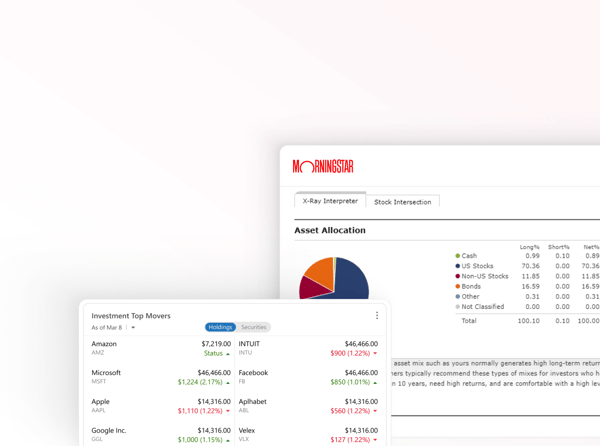
This service is geared toward those who prefer a simpler, more streamlined interface compared to the traditional desktop version, emphasizing ease of use. It does not offer the in-depth portfolio management features found in the classic Quicken desktop software.
The pricing is set at $3.99 per month, billed annually, providing users with web and mobile access along with tools like spending plans and cash flow projections to help manage finances effectively.
Price $3.99 • quicken.com
Quicken Business & Personal Review
Quicken Business & Personal is a cloud-based app designed for freelancers, self-employed individuals, and small business owners to integrate their business and personal finances. It provides tools for cash flow management, tax scheduling, invoicing, and tracking expenses in one platform.
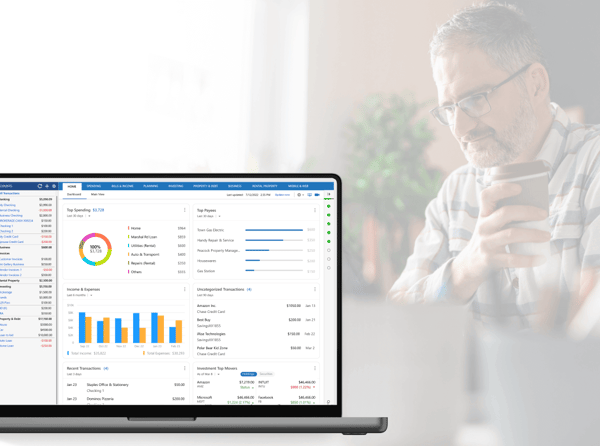
The software combines personal finance features with business management capabilities, supporting unlimited clients and projects to help users streamline their financial tasks. It is positioned as a mid- to premium-level solution that caters to both personal and business needs.
Subscription is $7.99 per month, billed annually, granting access via mobile and web with customizable reports and payment integration. This allows users to monitor and manage their finances with flexibility and comprehensive insights.
Price $7.99 • quicken.com
Quicken Pros & Cons
Quicken offers comprehensive capabilities for tracking investments, rental properties, and retirement planning, making it suitable for users with complex financial portfolios. The software provides detailed and customizable budgeting categories, along with fast and efficient bank statement reconciliation. It supports both Windows and Mac desktop versions and includes cloud-based options for mobile access.
However, some users find the subscription fees relatively high compared to previous one-time purchase models. There are occasional connectivity and syncing issues reported with certain financial institutions, and customer support experiences can vary, particularly concerning auto-renewal processes. These factors may affect the overall user experience depending on individual needs.
- • Comprehensive investment tracking
- • Customizable budgeting categories
- • Efficient bank statement reconciliation
- • Support for Windows and Mac
- • Robust retirement and tax planning tools
- • Extensive financial institution connectivity
- • Cloud-based mobile access options
- • High subscription costs
- • Occasional bank connectivity issues
- • Variable customer support experiences
Quicken vs Mint
Quicken offers a desktop-focused experience with advanced tools for investments, taxes, and property management, while Mint provides a free, cloud-based budgeting solution with simpler features. Quicken requires a subscription and supports both desktop and cloud applications, delivering extensive reporting and forecasting functionalities. Mint is free and targets users with basic budgeting needs, favoring simplicity over depth.
Users who need detailed, long-term financial management often prefer Quicken for its comprehensive capabilities. On the other hand, Mint suits individuals looking for straightforward budgeting without the complexity or cost of subscriptions, making it a practical choice for everyday personal finance management.

- Desktop and cloud support
- Subscription model
- Investment tracking
- Tax and property management
- Extensive reporting and forecasting

- Cloud-based only
- Free to use
- Basic budgeting tools
- Less customizable
- Focus on simplicity
Quicken Return Policy
Returns are accepted within 30 days from the purchase date. No refund fees are charged; however, shipping and handling fees may apply if relevant. A dated receipt is required for the return to be valid. Products must be returned within this 30-day period to qualify for a refund.
The return policy excludes digital subscriptions that are not active beyond their trial or have restricted use. This policy applies exclusively to customers located in the U.S. and Canada. Digital products outside these conditions are not eligible for return or refund.
Quicken Delivery and Availability
Regions: Quicken products are available digitally in the United States and Canada only. Delivery is primarily through digital download or online access, with physical shipments being uncommon.
Timelines: Digital products are delivered instantly upon purchase. Physical product delivery timelines depend on the chosen shipping method. Quicken products are not designed for use outside the U.S. and Canada.
Quicken Warranty
Coverage: The software subscription includes updates and technical support for the duration of the active subscription period. This coverage ensures users receive regular enhancements and assistance while their subscription is current.
Limitations: There is no hardware warranty provided, and coverage ends if the subscription lapses or is cancelled. The warranty does not cover data loss or issues arising from third-party integrations, and users are responsible for backing up any locally stored data to prevent loss.
Contact Quicken Support
Users can reach Quicken customer support through various channels depending on their subscription plan and specific issues. Support is accessible via phone, email, and online portals for efficient assistance.
- Email: [email protected]
- Support center via https://www.quicken.com/support
Contacting Quicken support is encouraged to resolve any account or technical questions. Accessing these options through the official website ensures up-to-date and accurate assistance.
Where to buy Quicken?
Quicken is officially available for purchase directly from authorized sources, with the most reliable option being the official website where users gain access to structured account management, customer support, and clearly defined policies; purchasing through quicken.com ensures transactional security and timely updates, while being aware that availability and user experience might vary across different marketplaces, which may have differing stock and policy standards affecting service consistency.
Conclusion of Quicken reviews & ratings
Quicken holds a significant place in personal finance software by offering comprehensive tools for budgeting, investment tracking, and retirement planning. Many users value its detailed reports and ability to manage complex finances, with solid support for both Mac and PC platforms. More details can be found at quicken.com, which outlines its core features and tools.
For those interested in exploring Quicken’s capabilities, it’s helpful to revisit this review to understand how it fits individual needs. Confidence in navigating its features can grow over time, and the Quicken review provides a balanced look at its strengths and challenges.
Editorial notes reflect aggregated buyer feedback and our independent editorial review of publicly available information. They are for informational purposes only and do not constitute endorsements. Purchases are made at your own discretion, and we are not responsible for transactions or outcomes related to this store. Experiences may vary. This content is assisted by AI and reviewed by our editorial team. While we strive for accuracy, AI-supported information may not always be 100% precise, so please verify any critical details.

